Showing posts with label Tips n Tricks. Show all posts

Tuesday, July 08, 2014

Seagate FreeAgent GoFlex Home 1TB Not able to detect

  Ok. So earlier this year, as I was trying to back up my hard disk to my NAS which is of course the Seagate Goflex Home.  And while halfway trying to access the NAS, my file explorer refused to respond and the next thing I knew. Everything was gone.  Tried accessing from the website stated there was no device being connected.  And you could imagine the horror I've gone through where I almost fell into absolute shock because all the pictures and videos of my baby girl gone just like that!  I did what everyone would have done, reboot the device hope that all will be well. That didn't worked.  Turn off maybe a few days for the hard disk to rest and hopefully when it's back on it will magically appear once again.  But that didn't work too.  

  So I decided not to do anything about it. 7 months after the incident had happened and I totally forgotten about it (probably trying to deny the fact that I didn't want to tell Deluxe that Esther's photos were gone).  After installing Ubuntu 14.04 onto my old desktop, I decided to try accessing the hard disk once more.  Lo and behold, I was finally able to see that it's actually connected in a sense where there is the 4 folders which by default it has.  One for backup, external storage, personal folder and public folder.  I got so excited that I tried to access it but still failed. Whereby suddenly I had the inspiration in doing this.

Flipping the hard disk this way instead of standing vertical
  Instead of letting it stand vertically, I made it lie flat on like the picture above.  Initially when I flipped the wrong side, the hard disk wouldn't run.  But after flipping this side round.  Once I turn on the NAS sweet sound of hard disk spinning and everything was back to normal.  I tried accessing it one more time, finally after 7 long months all my files are still intact!  So I quickly transferred all the videos and photos out from the NAS onto my desktop. So now, I'll most likely get a replacement hard disk for this NAS.  And probably pop the current hard disk into my desktop and see how it goes.  Never the less I'm glad that I can get back the files and once I replaced the hard disk I'll probably go and format my laptop to run Ubuntu instead :)

Saturday, March 15, 2014

After Using Hotlink For 3 Months

Ok. 3 months ago I went and MNP over from Digi to Maxis due to the fact they were providing free basic internet.  And I was wondering how much I actually saved on my phone bill eventually.  Within the past 3 months I have managed to reload 3 times and used up max RM40 for these past 3 months.  Never the less, after hearing that LTE has finally arrived here in Kuching.  Only few days ago I went and subscribe for RM30 where they gave me 1.5GB quota.  And boy am I spoiled by the speed.  Of course I had to change my sim card as well in order for me to enjoy the max speed which gave me about 10mbps upload and download.
  But that is totally beside the point on how much I actually saved using Hotlink prepaid.  Well for starters, after 3 months using Hotlink.  Total cost I used was RM70 (RM40 for calls and SMS, while another RM30 was for the 4G Subscription).  Where I actually managed to slash my phone bills in half in a sense because previously I would be paying RM60++/month on contract.  While outside contract would had cost me close to RM90.
  One main reason why I managed to save a lot which I believe is due to the Data subscription.  Because most of the time I'm always situated where I have wifi connection, and of course the Basic Free Internet that Hotlink offer is just good enough for receiving Text from Whatsapp, Viber, BBM, Telegram and etc.  Plus I don't really need the speed whenever I'm out because I will be out for at most 1-2 hours, but still be able to receive messages through those social networking apps.
  Never the less, will definitely MNP Deluxe number once she uses up her credits to Maxis, because Maxis also now gives you Activ10, where their call rates would be at 0.06/30 secs and 0.01/sms (which I hardly use).  And you pretty much can save more from there.
  Anyway, only problem I had previously was when I went down to Plaza Merdeka Lower Ground, I was not able to receive any signals.  But after upgrading my sim card to 4G, seems like it managed to resolve that issue.  Not too sure yet, but will try it out again within these few days.
  So, being a cheapskate that I am.  I think RM30/month for phone bills is not that bad.  And another thing is taht I hardly call or sms people because most of the time you either skype on wifi or message through whatsapp.  No doubt that I won't be able to surf outside wifi vicinity, but hey at least it gives me chance to actually talk to people who are in front of me instead of looking at my phone the whole time.  It's all good.

Wednesday, December 04, 2013

#Hotlink Free Basic Internet Plan Review

Ported from Digi to Hotlink
  2 days ago, I went and port my number from Digi to #Hotlink latest plan which gives out Free Basic Internet.  After reading a few sites that gave it's review I decided to jump ship to Hotlink.  So I went to the Maxis Center at Kenyalang Park, where I was able to process my application in order to port my number from Digi to Hotlink.  (The one in Saberkas was not able to do it for me, so don't bother going there). 
  Anyway, the whole process took less about 10 minutes, where I needed to give a photocopy of my IC as well as pay them RM10 for the so called processing fees.  But the person told me that, this RM10 will be credited back once the porting is successful.  After that they gave me a new sim card, and told me it will take about 1 day for me to switched over to Hotlink.  But before that, I had to double check with them that I'm going to port to the new #hotlink plan that comes with the Free Basic Internet.

Monday, November 25, 2013

Installing Google Apps Playstore for Huawei G520-T10 without flashing

It's been 2 days while I was trying to see how to install Google Apps and Contact Sync into this phone, and I've finally managed to do so without having to flash the phone because I didn't want the hassle to write to Huawei just to send me a bootunloader code. Never the less, this is how I did it in 3 simple steps :-

Root Your Phone 
1. Download and install SRS Root to root this phone.
2. Run SRS Root
3. Connect your phone to your PC
4. Run SRS Root
5. Select Root Device (All Method)
6. Follow the instruction until it ask you to check your phone to select which Root Apps you need to install.
A) Select Install SuperSU (as SuperUser didn't work on this phone), and tap on the name that shows under the line (I got Boromir. Think it will generate a random name from Lord of the Rings).
B) Once it gives you a success message on your phone click OK button in SRS Root, and wait for it to finish removing the app.
7. After completing it, Reboot your phone.

Install Root Explorer
1. Download Root Explorer
2. Copy Root Explorer apk to your phone.
3. Install Root Explorer on your phone.
4. Run Root Explorer and grant permission to Super SU for this App.

Install Google Apps On Your Phone
Ok for this segment here, I need to clarify in order to prevent any confusion for other models of Huawei G520.  Because G520-T10 uses Android version 4.2.1, I've extracted 6 files from Google Apps 20121212 which are the following files.

  • GoogleCalendarSyncAdapter.apk
  • GoogleContactsSyncAdapter.apk
  • GoogleLoginService.apk
  • GoogleServicesFramework.apk
  • OneTimeInitializer.apk
  • Phonesky.apk (this is google play)
Attach the files for the 6 files you can download here.  For other Android version please visit here [Rootzwiki] to download the google apps for your Android version.  Ok let's get started.

1. Copy all 6 files to your phone.
2. Open Root Explorer
3. Copy 6 files \System\App
4. Reboot your phone.

And that's it!  You should be able to run Google Play store, and sync your calendar and contacts with your Gmail account.  Hope this helps!


Thursday, July 18, 2013

D.I.Y Minons

Miri McD Drive Through
Ok everyone have been crazy with the Minions and had to rush to McD just to get a piece of the action.  And of course at the end of the day, kids who really want them ended up not having them.  Anyway, here's a solution for those who really want to have minions without having to fight with others.

1. Like this page Story Craftz
2. And click on here to check out her album.

She will be doing a video on it soon, hence it is better you Like the page in order for you to get the latest updates.  Here's a sample of how it turned out in the end.

Pa Pooi?

Her latest tutorial can be found here :- http://storycraftz.com/tutorial-minions-from-despicable-me/

Thursday, July 11, 2013

Flash Sony Ericsson Live With Walkman Jelly Bean 4.2.2

You can now install CM10.2 aka Jelly Bean 4.3 onto our phones. It's still currently in alpha testing stage, but so far everything seems to be working well. Installation is similar, you can download the rom here CM10.2 Rom. For more details you can check out the link here :- {Mini/MiniPro/Active/Live}[DEV][JB 4.3][CM10.2] LegacyXperia
Ok.  So after going through so many post as it was all over the place, I was finally able to flash my spare phone Sony Ericsson Live with Walkman to Jelly Bean using Legacy Xperia Rom.  Due to the fact that Sony decided to dropped the idea of upgrading the 2011 series to Jelly Bean so it got stuck with Ice Cream Sandwich instead.  Anyway, I do not mind the fact where the phone is not on the list of upgrade but never the less, having Jelly Bean would be kinda cool actually.  Do take note that this rom also supports Sony Xperia Active, Xpria Arc S, Xperia Mini, Xperia Mini Pro, Xperia Neo, Xperia Neo V, Xpreia Pro and Xperia Ray. So without further adieu, let's get straight to it.

Thursday, April 04, 2013

Installing Whatsapp On Your Desktop, Laptop, or Macintosh

We have set up a long term Cash Bonanza for you
So you want to install whatsapp on your computer, and probably there are 3 reason you want to do this.
1. You don't have a smartphone.
2. You want to be cool, and reply whatsapp messages on your PC is easier and faster.
3.  Because you can!

Never the less, here is how you can do it.  Introducing Bluestacks, a software that enables you to run Android Apps on your PC.  Ok, so let's get straight to the point on how to get this done

Thursday, January 17, 2013

AEON Credit Card Scam *updated

We have set up a long term Cash Bonanza for you
21.03.2013 *Updated
Today they called me up again, and told me the same story saying that they were from the collection department.  This time to cut long story short, I say ok will go to the bank and make payment.  And the guy just hung up.  Anyway this time the phone number that came in is +32719999.  And you can find out more how they managed to clone the number here. (http://www.aeonmalaysia.com.my/acs/static/htmls/ScamAlert_v3.html)

Received a called from AEON Card Service collection department with the number 03-2719 9999. Stated that I owe them RM5800, and asked me to pay them. So I told the person Jack, said I don’t have any credit cards with them. He then informed me that I personally went to their branch in Puchong, and applied there last year. I then asked where the credit card statement was being sent to, and he told me to an address in Selangor. And he told me that I had made 2 transaction one in KLCC and another in Pavilion. So he asked me to verify my IC, but before that I wanted him to fax me the statement. He said due to Private & Confidential issue, he cannot fax the statement to me. I then shot him back asking that is my name, and (yeah he read out my IC but I didn’t confirm) he should release that statement as I want to make a police report. He then said, they had made a mistake and will rectify the issue and hung up.

After he hung up, I went and google the above number indeed it was from AEON Malaysia call the number above and tried to talk with the customer service. So the first thing they asked me was if I had any account or credit card with them. She CS told me to just ignore the calls, as they have been getting a lot of calls regarding that issue. But I did told the Customer Service that the number I got from my phone is from AEON Customer Care line, where she replied stating that “We will never call clients using this number” as it is only to receive phone calls from customers. So as long I didn’t provide any personal banking details, it should be fine.

After the call, I headed over to AEON Malaysia website again, and click on their scam alert (http://www.aeonmalaysia.com.my/acs/static/htmls/ScamAlert.html). Lo and behold, my case was pretty much similar but it didn’t go pass step 2. Because I insisted that he fax me the bank statement first, then I will proceed to take further action.

Because times are tough now, there are a lot of scams going on. So remember to remain calm, and never give away your personal details banking details (Address, IC, Mother Maiden Name, Credit Card details, etc). Never the less, always keep yourself inform the latest scam in the following website :-

http://www.abm.org.my/e-Banking_Fraud_Awareness_Campaign_2013.aspx
http://www.bnm.gov.my/microsites/fraudalert/index.htm

If you know any other extra websites, feel free to add on to this.

Here are the tips that was given on Aeon Credit Card Service
WHAT TO DO?
1 - Please be reminded to ignore such call/ sms/ email and to refrain from giving personal banking information to anyone under any circumstances. Financial institutions, including credit card issuers and Bank Negara Malaysia and all banking institutions will never request for personal banking information when contacting customers, be it via telephone calls, SMS or emails.
2 - Lodge a police report
3 - Walk-in to any nearest bank branch / Call customer Care Line

Wednesday, December 08, 2010

Podcasting Equipment

Hardware

[caption id="" align="aligncenter" width="432" caption="Headsets ranges from RM15-RM50"][/caption]
Ok. Many of you may be wondering how I do my podcast or songs recording and how much it may have cost to do something like this. Well, if you really want cheap I suggest that go for the normal headsets like what I have put on from the picture above.  I started using that for the first few episode of my podcast, and it may not be something great but it does the work just fine.  And if you were to record guitars on it, it will sound just fine as well.


[caption id="" align="aligncenter" width="432" caption="Samson CO1U Condenser Mic (USD100)"][/caption]
Ok, I got this baby a few weeks after doing my initial podcast.  And the sound quality did improve A LOT.  This actually was a little unnecessary because back then I didn't really had much thought on what I plan to do with it.  After reading some reviews on it, plus doing some research I ended up getting this instead.  Not only did it helped out on the sound quality, it does eliminate a lot of "air" sounds compared to the previous headset microphone.  I had a hard time adjusting the setting at first, because it was super sensitive.  Plus it only records on Mono, Left Channel only.


[caption id="" align="aligncenter" width="432" caption="USB sound card with Line In less than USD10"][/caption]
If you notice just next to the laptop on the right, and slightly above the headset you should see a device that actually has jack being input to it.  This is actually a USB Sound card that has a line in, and it has 7.1 channel.  I used this to record Skyp  conversation or anything that goes through the system.  The reason why I got this was because I didn't have any line in port on my laptop.  But after getting this device, there is actually a line in port on the laptop which uses the same jack as the microphone.  So I was a bit upset, as I thought I could have saved about USD8-9, when purchasing this sound card.  But never the less, I found another usage for it whereby I was able to output the sounds to 2-3 head sets if necessary.  Plus it comes in handy during the recording part which I will explain later.


[caption id="" align="aligncenter" width="432" caption="Pop Filter, Spider Mount & Mic Stand"][/caption]
This few things I only got it recently.  Both the pop filter as well as the spider mount I got it less than USD40 from a seller on eBay.  Whereby combine shipping is crucial and a lot of negotiating was done before I paid for it.  And as for the mic stand, I got it at quite a bargain considering that this is 2nd hand.  Plus the condition really looks new, and it still does the job perfectly.  Total for this is probably less than RM180 all in all.  I had to buy them separately, so it was less painful to the wallet. Hehehe.

Software


[caption id="" align="aligncenter" width="253" caption="Audacity Recording Software"][/caption]

If you can't afford Adobe Audition like me, Audacity works great just as it is.  It has all the features that you need to do, to record your podcast or songs on to it.  It has a multi-track system whereby for instance you can play the piano, then after that you can record your guitar, and maybe finally your vocals.

The reason why I use this method is that, not only it helps add a lot of instruments to your songs but also saves time on errors.  You can actually edit certain parts if you made mistakes and it really saves up a lot of time.  You can also select the different inputs when recording, hence what I did for my skype recording.  I selected the USB sound card as input 1, and my samson USB mic as the 2nd input.  So basically that's how it works.


[caption id="" align="aligncenter" width="464" caption="Skype For Conversation"][/caption]

Finally I use Skype for all the podcasting session whenever I have guest who are currently far away from me.  The reason why I use this is that, it supports group conferencing.  So I can have more than 2 guest to talk to, as how I did on my previous shows which you can listen to.  If your other guests has skype, then you can actually call them for free.  But if you don't, you can use their credit system like a prepaid card like that.  Quality wise you can check it out when I did the mooncake festival with 4 people.

So that's pretty much about it.  Probably my next target is getting a  USB Mixer.  So at least I can do a proper recording for my keyboard as well as guitar.  But I might or might not get it, depending how things goes in the future.  Lol.  So that's pretty much about it from a cheapskate podcaster/recording artist wanna be. Hahaha.

Thursday, December 02, 2010

Preparing For Tomorrow


For those of you who are currently using Ubuntu, and uses the IM pidgin.  You would notice that there is always a notification for those who comes online or goes offline, or even receiving new messages.  You can check out the post here on Disable Online User Notification in Pidgin, which really helps a lot.  So you won't be disturbed all the time unnecessary.

And as you know, each time whenever Ubuntu upgrades itself it will add a new boot menu item in your boot menu.  Especially for those who are running dual boot, it's really a pain by selecting the item you wish to boot into.  You can go to this post "Clean Up the New Ubuntu Grub2 Boot Menu" to pretty much clean up your boot menu.


So today is 1st December 2010.  And it has reach the final month of 2010.  How times flies, especially when you're busy or don't really take time to stop and smell the roses.  And as you all notice, after I changed the template for this website 3 weeks ago.  I have been trying very hard to be consistent in doing a post everyday, and so far I have yet to miss one apart from Sunday.  It helped especially when someone who have been supporting me all these years, kept on encouraging me to write and be consistent.   So at least, whenever I start to do anything in the future, I will keep on doing it and don't fall back halfway like I always used to.


[caption id="" align="aligncenter" width="432" caption="Fisheye on DUN"][/caption]
If you noticed on my side bar, I have already put a list for my 2011 resolutions on what I want to achieve next year.  I didn't do one this year, because I don't know what I wanted unlike my previous years.  I'm still thinking on what I plan to put on that list, as I still have another 31 more days to finalise it and start working on it to achieve my target.  Another thing I'm working on is also pretty much plan out on how am I going to achieve my goals, especially goal #1.  It may not seem much, but I shall try to give it a shot.

I was a bit emo today as how Dennis would put it as, I feel that this year went by so quickly compared to previous years.  I don't know why, but somehow I felt that I didn't achieve anything much.  Whereby I still saw myself last year sitting at the same position and pretty much living the years as it is.  One good reason for that was that, I didn't set myself a target on what I wanted to do or needed to do.  Maybe that's why nothing happened, and I was so excited when 2010 came.  But I didn't do anything, when it came.


[caption id="" align="aligncenter" width="432" caption="Holankia Talkshow"][/caption]
But looking on the bright side of 2010, I feel that God has been preparing me in a lot of ways.  And at times, I really feel that being hopeless He is always there to watch over me.  And no doubt, that life goes on He remains the same.  And not to forget that The Holankia Talkshow has been started, where I actually had big plans for it.  But apparently died slowly due to lack of ideas on what I want to talk about.  But it was fun while it lasted, and it sort of gave me the courage to pretty much do a video log after that.  So I think it's a good start, and will try to plan to talk about something as well starting next year.

Plus since I'm planning to head back into song writings again, hopefully I would have enough time to do something about it.  As I've put that talent away for a very long time already, and it's kinda hard to get inspired to write something.  But never the less, I know it will come back if I keep on working on it.  Maybe that's why I started the podcasting series, which actually got me to figure out on how to record stuff onto my laptop. So hopefully by end of next year I might have something to show already.  Hehehe.


[caption id="" align="aligncenter" width="432" caption="Christmas is around the corner"][/caption]
So since Christmas is around the corner, I may as well start doing something about it as well.  So this the time to be busy, and I have been seriously slacking off.  But will go back to top gear starting tomorrow, as I need to sort out a few more things again.  Hopefully by then, things will pick up before the year ends.  And it's kinda exciting when you draw out your plans and being able to work on it.


[caption id="" align="aligncenter" width="428" caption="Family First"][/caption]
But one thing I learn this year is that, above all things I need to do everyday.  I have to make sure family is always first.  Been pretty much neglecting in a way, whereby been so busy with activities but don't really spend time with the family.  Things really brighten up, when I decided to stop from other things to spend time with the two important people in my life.  And positive things do came out from all that, so I guess it's a good sign.  Anyway, going to close up now.  You guys have a good one.

Friday, November 19, 2010

Beware of Torchlight Stungun


Ok. Not too sure how true this is.  But never the less we should always be careful.  Was supposed to do a Podcast tonight, but won't be doing it as I'm not  really feeling too well.  Anyway, read on.


You can buy this at Lorong Kulit!  Less than RM100!

Stungun Torchlight

Please be aware, especially the ladies, and be extra careful as with the slowdown in the economy you can expect some people to resort to crime to make ends meet.

Must Read!: Torchlights (Stungun) Beware (to all drivers)

Hi There,

FOR YOUR INFORMATION, latest weapon used by robbers.

THIS IS VERY IMPORTANT. NO MATTER HOW BUSY YOU ARE, YOU MUST GIVE YOURSELF AT LEAST 3 MINUTES TO READ THIS!

I just thought to let know what my doctor told me recently. I don't think she was lying and neither am I, so please pass this on to your friends. Her clinic is in SS2 and you know how congested that place is.

One morning a few months ago in broad daylight, a girl was getting into her car when a few men approached her with what looked like a  torchlight. Quite harmless looking. They pressed the "torchlight" into her back and immediately she went limp and very pale. So she wouldn't be able to fight back, they slashed her thigh with a parang and sped away in her car.

There were many people around and they quickly took her to the  nearest clinic which was my doctor's clinic. There were two doctors at that time and they managed to stitch up her wound but the girl remained pulse-less and still pale as paper. No pulse, no BP (blood pressure). Just like dead.

My doctors were confused as to how one wound on the thigh made the girl almost like dead? They managed to revive her and save her life.

After some checking around, the doctors found  out what actually happened was that the girl was made unconscious not by a torchlight but actually a high voltage weapon. I forgot how many watts she mentioned. 1000? Anyway, it was high enough to kill a person by electrocution.

It seems this weapon is from China. It's not rampant in Malaysia...yet; but with this thing, a person can rob, rape, kill, kidnap, and practically do anything to you. My doctor said that if the girl weren't taken to the clinic immediately she would have died because there was no pulse on her.

So please just beware of your surroundings, if anybody is lurking around with a torchlight-thingy and approaches you, just scream or run away. Better to be embarrassed than ZAPPED and fried, right? Take care.

This item is called "stungun".

Wednesday, November 10, 2010

Installing Android Froyo 2.2 onto HTC TYTN II Kaiser

We have set up a long term Cash Bonanza for you

Ok.  This may seem an long overdue post as I didn't really had time to actually write a guide about it. The method I'm listing down here is installing Froyo onto your SD card, so that you won't need to worry about flashing your phone for this to work.  Ok on with the show.

Things You Need

1. Minimum of 1GB SD Card
2. HTC Kaiser TYTN II Phone (Best if your using WM6.1)
3. Andboot
4. Incubus26Jc's Super FroYo 2.2 - Current version RLS15 (02-09-10)

Preparation

You can use partition for the SD card if not just make sure your SD card is formatted to FAT32.  Read here on how to Partition your SD Card.  You need to create 4 partition if you are using this method.

Partition 1 = ext3 at 260mb, Partition 2 = ext3 at 260mb, Partition 3 = Swap at 80mb and the remaining balance is for Partition 4 formatted at Fat32.  If you don't want to partition it's fine as well.  Just make sure your card is formatted to Fat32 and you're good to go.

Let's Go

1. Unzip the file ANDBOOT.
2. Copy the whole folder on to the SD card
3. Unzip the file Incubus26Jc's Super FroYo 2.2, and you should get a file andriodinstall.tgz
4. Copy the andriodinstall.tgz into the Andboot folder that you have placed inside the SD Card.
5. Once copied reset your phone.
6. Run File Explorer on your phone, go to Storage Card --> andboot --> run the program haret.

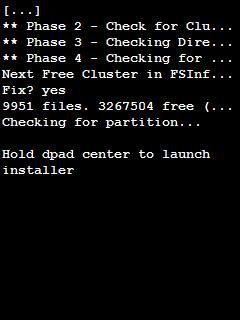
The next step here is very important and you might need to be aware of.  Once you run the program haret, you should see the linux penguin on the top left and it will have a lot of words running down.  But it will stop for about 2-3 seconds when you see something like this.


[caption id="" align="aligncenter" width="240" caption="Hold The Middle Button"][/caption]
7. When you see that message, quickly hold the center of the D-Pad Button then it should bring you to an installer as shown as below.


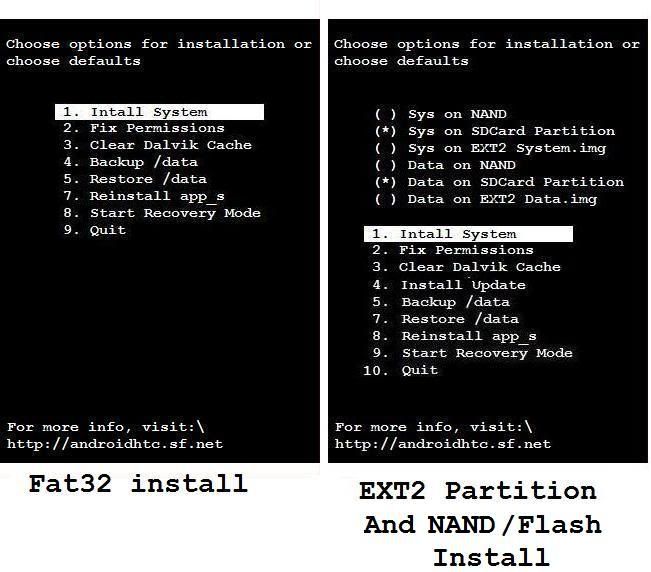
[caption id="" align="aligncenter" width="456" caption="Installation Menu"][/caption]
8. If don't partition your card it will look like the one on the left.  If you did, it will look like the one on the right.
9. Press Install System
10. Select Yes to wipe system. And Yes again to wipe data.
11. Just let it run until you reach back to the Main Menu.  Once you reach there, select EXIT.


[caption id="" align="aligncenter" width="320" caption="Welcome Screen"][/caption]
Once you exit it should run a few more command lines before you should see the welcome screen like the above.  And a few seconds after that you should see a green ball eye kinda thingy.  And it will take quite a while before it loads up Froyo.

12.  Once you've got Froyo running inside your phone, don't set the time, data or sync with your google account.  Just skip any process you see until the main page on your phone.  Next step is very important.

13. Don't touch the phone, and leave it for 30 minutes.   From what I understand is that, Froyo is in the midst of copying files and building some data or some sort.
I know you've all been dying to play with it, but best leave it for at least 30 minutes.  I left mine for at least an hour, and not only it improves on performance but also prevent a lot of errors compared when I straight away played with it once it finishes installing.  So be patient!

14. After your 30 mins long wait is over, hold the power button and select reset the phone.
15. Run File Explorer --> Storage Card --> Andboot --> Run Haret.
16. This time just by pass the dpad instruction and let it run through till you reach the Andriod Main System.

Now you are ready to go and play with your newly installed Froyo on your HTC TYTN II.  It's way much cooler compared to Windows Mobile that's for sure.  Anyway, there are still limitations on this system whereby I think they still have a bit problems with the bluetooth audio, and of course the front camera is not working.  But I seldom use those features so I think it's ok.

If you have problems whereby instead of getting the welcome screen, but rather those funny color lines flying here and there.  What you need to do is :-
1. Go to Andboot folder in your sd card
2. Edit the file startup.txt
3. Change the panel_type =3 to either 1 or 2 to see which one works.

If you would like to sync your outlook contacts with your freshly installed android phone.  I would suggest CompanionLink.  It's free for 14 days, just enough time for you to sync all of your contacts.  You need to go to the market place for android and install a client for it to link later.

Small issues that I face when running this OS is that, it consumes a lot of battery usage.  One way of conserving the batteries, was disabling all the extra animation features, switching to 2G only, and turning off the data usage.  And make sure you always turn off the wifi before your phone goes to sleep as wifi will still be on even in sleep mode.  But apart from that everything else seems fine.

In conclusion, it's really fun being able to run android on my HTC.  Somehow it sort of prolonged the life span of my phone in terms of usability.  As you all know that most of the software being developed currently are for blackberry, iphone and android phones.  So, at least I'm still able to play with my phone till I decide to replace it with another one.

Good luck and have fun!

Credits goes to :-
1. The developing teams of Incubus26Jc's Super FroYo 2.2 for making all this possible.
2. ghghgh14702 for preparing a flawless kernal and image files. (Believe me after 1 year of searching for the kernels and image files separately, his one was the best matched with no problems)
3. j101399j for preparing easy to use image instructions, you can actually get them here.

Saturday, August 28, 2010

Installing Software U Mobile Sou aka Verzio Duplii


Before I go on, I would like to take this opportunity to thank Dennis for lending me his gears on Tuesday. With it, I was able to successfully change Deluxe Sony Ericsson K850i LCD. The LCD cost itself was only less than RM37, compared to the ones they tried to charged me about RM110-RM180 to get it replaced. Anyway, it's functioning properly now despite being slightly darker compared to the previous LCD. Anyway, I had to refer to this website on how to dismantle Sony Ericsson K850i.  So it's all good now, and saved about RM80, which I think can be used to buy something else ;)  Thanks again Dennis.


Ok for those who are currently owning the U Mobile SOU or also known as Verzio Duplii.  You might be wondering how in the world you are going to install applications onto your phone.  Well, for starters you won't be able to install it via the PC Tools that came along with the CD.  Kinda disappointing don't you think.  In order for you to install software onto it, you need to be connected to the Internet.

What you need is to locate the software for your phone before you can install them.  For your information, the LCD screen size for the phone is 240 x 320.  So any java games or applications that has that screen size, you should be able to install it to your phone.  For starters you can head over to operamini.com and install an opera browser on your phone to pretty much understand how it will work.  And to locate the program on your phone, it is under entertainment and you should see java box there.  Inside the java box is where all the applications will be stored after the software that has been installed.  But if you have internet based software or software that requires you to connect to the internet, you must first set the proxy address in order for it to work.

For those software or applications that you probably developed or got it from a friend.  What you need to do is first compile the .jar extension files into into a .jad files. I use Jadmaker which you can easily google and download it for free.  Open up the Jadmaker and drag and drop the .jar files into the program.  It will automatically create a .jad file.  Upload both the .jar and .jad files onto your server, and point your browser to the .jad file, and voila.  You're good to go and begin installing programs onto your phones.

Good luck :)

Tuesday, February 09, 2010

Digi 3G now in Kuching

[caption id="" align="alignright" width="240" caption="3G detected on my HTC TYTN II"][/caption]
Yes, finally 3G has finally arrived here in Kuching. Apparently it was here for quite a few weeks already if I'm not mistaken. Anyway, you can read the real press release here. Miri is expected to receive 3G by mid of this year. So I guess it won't be long now before Digi will start to dominate in Sarawak really soon.  Apparently Digi seems to have the lowest fare compared to the other telcos.

Before I forget, in order for you to activate 3G for Digi, you need to call in their customer service at 016-2211800 and get them to help you activate that services for you.  You don't need to change your sim card, so I think that's great whereby you can straight away use.  If you still can't get any 3G signal, just make sure your phone is set to GSM & 3G.  If nothing happened after 10 mins try restarting your phone.  Then voila you managed to get 3G connection already.

Anyway, so what happened was that I sort of managed to max out my RM5 cap yesterday and did a trial run with Digi's 3G feature.  I was told that currently they are only able to make video calls within the same network.  I tried to do a video call to my mom but unfortunately I was not able to get connected.  But I did a test call to Deluxe's phone and apparently it worked. Quality wise was ok, but due to the fact that both the phones were near to each other ended up giving up feedback instead.  Hehehe.  So I think it's not really a problem.

Next up, I was testing their internet connection.  Somehow rather I ended up instead of getting 3G, but rather a HSPDA connection when browsing the Internet as well as downloading some stuff through my phone.   Soon another friend of mine from Brunei so by happened to be online last night so I got him to try and have a Skype conversation.  Connection wise started to go a bit funny as it drops down from HSPDA to 3G then to Edge and vice versa.  So my friend asked me to pretty much force my phone to lock it at 3G, which pretty much solve the problem.  And the conversation was clear, despite the 1 second lag and he was using speaker phone.  As far as I know that Celcom and Maxis had already blocked VOIP whereby I was able to hear what my friend was telling me, but he was not able to listen what I said.

I've forgotten to try Youtube so I guess I'll try it out some other time.  I noticed something today, when I was downstairs in my shop my connection dropped to Edge, and when I went up stairs to get something it goes back up to 3G again.  No wonder the customer service person asked me to switch on to dual mode which was GSM & 3G.  But when I tried out forcing it to stay connected to 3G, my phone connection was cut off.  Hehe, so I guess I might need a booster antenna or something in order for me to receive the signal.

I was still able to receive incoming calls as well as SMS during my connection via 3G to the internet.  But I think it got temporarily cut off whereby priority ended up to the phone calls as well as SMS when it came in.  Never the less, I'm pretty much happy with the fact that Digi has finally stepped up its game in providing this service for their loyal customers.  Lol.  And another thing was that I did sort of post Digi a question via Twitter if they were going to provide prepaid users blackberry services.  Well, apparently I got a reply from them "We would if u want us too ;-) Y r u looking at prepaid? Have u seen this hot hot plan? http://cot.ag/c8WWD6".  And I immediately replied them Yes Please!.  So let's see how are they going to do this, and see how they are going to beat the other telcos in terms of pricing.

Oh the reason why I asked for blackberry was that, if you notice on the bottom right of my phone there's a blue thingy.  Well, I just installed the blackberry software which enables my phone to act like a blackberry now.  Which I think would be cool especially when I go out and leave my messenger on.  Lol.  And of course will still be able to receive incoming mails especially from important clients.  But apart from that, it's all good.  So thumbs up for Digi, and I hope you can continue to make us happy.  By the way, they're giving out one free BlackBerry Curve 8250 for some lucky person with the most creative post of them with a Blackberry.  You can check it out on their facebook page.

Another funny thing happened, in the midst of trial and error.  Apparently my dual sim card sort of went hair wire because my other Sim which was using Celcom was not able to detect at all.  Whereby, Digi was still able to detect 3G signal despite that I was using that sim card adapter.  Why I say this was that, whenever I would want to use a 3G connection for my Celcom sim card, I need to take out the adapter and installed the ghost sim so that I am able to use 3G services.  But to my surprise I didn't had to when I switch back to my Digi sim card.  Will try to figure out how to fix it, if I'm able to use both services then I won't need to switch my sim card all the time.  Hehehe.  Have a nice day everyone!

Friday, January 22, 2010

Will Be Porting in 24 hours

Ok.  I've decided to keep it short.  While I understand there are a lot of ping backs right now.  So sorry for the inconvenience caused.  I've managed to transfer most of my post here.  So it won't be long now till I shift this blog to the main address.  And there were a few glitches that was needed to fix the template.  So hopefully by tomorrow I will get everything running back in order.

Was busy trying to find a way to move from Joomla to Wordpress.  I guess, as much as I love Joomla.  But it's not showing me any love with SEO as well as TLA.  So hopefully things will start to pick up once again when I move back to wordpress.  Yes, it's a long and hectic job.  But at least I got most of my post converted.  The only last thing I need to do is basically sorting out the categories for each post.  Never the less, I won;'t be adding any tags to it as I'm a bit too lazy for that now.  So what I plan to do is sort them into categories maybe phase by phase.  And hopefully everything will be sorted out before this end month.

There were a lot of post I would love to post about.  But due to fact that I couldn't move from Joomla to Wordpress which pretty much took a lot of my time.  And as for the template, I've decided to go back to the regular blog format as I was getting a lot complaints because it was difficult to access my site.  And not to mention it took a while for a page to load.  Never the less, it's all good.  And I've found quite a lot of nice plugin for this site.  So hopefully I won't need to move back to joomla again.  Lol.  It's all good.

Anyway, closing time now.  Catch up with you all soon :)

Wednesday, January 20, 2010

Having Problems Migrating

Yes, I'm migrating back to Wordpress from Joomla.  As I've been getting a lot of problems with adding some codes to the post.  As much as I love Joomla, but I don't think it's suitable for me, despite the fact that I love every features it has.

Anyway, I'm still in the midst of trying to port over from Joomla to Wordpress.  There are wizards that enables me to do so.  But somehow it just don't work.  The only thing that work now is that I can actually port sections into wordpress.  But the problem is that it just doesn't fit into the category.  So I have to manually change the categories now.  And it would be a pain because I have like 500+ posts.  Lol.  Oh well.  Slow and steady wins the race.  Never the less, I think I'll go back to my posting now.  Will update once I finish porting over.

Thursday, January 08, 2009

Google Calender

Things are starting to pick up here. And I guess it must be a good sign. Hopefully there would be no hiccups in between and I am able to complete the task that I was given. Thank God for the abundant blessings He has given me. Anyway, had Alladin Fried Chicken last nite, and most likely it will be a while before we'll be going back there again :P


   Are you the type of person who has a lot of memorable dates inside your PDA or personal organizer? And there are so many important dates such as birthdays, anniversary, appointments or even public holidays. And hopefully you won't miss out on a very important appointment ;) Introducing Google Calender, whereby once you fill it up you will NEVER miss an important date again. Please take note that this is not a paid post :)


   For the past few days, I've been trying to get Google calender to work on my blog. And apparently it wasn't that difficult. I had install the Google Calender Plugin, and took me a while to configure it. And now it's up. So you can see on the right hand side there's a box of the events which I will be taking notice of. What you see now are all public holidays that I listed, as well as school holidays. I'll prolly explain why I ended up using Google Calender in the end.


   I was first introduced to this calender a few months back to help work out on the eBay free course which I participated. So basically, one of our colleagues would help set up our appointments, and just 1 day before the appointment google calender will email you a reminder regarding the appointment. Back then google would be able to sms to Maxis as well as Celcom, but not for Digi. So I never really took it seriously back then. But just recently when I tried fiddling around with it once again, this time Digi is able to support the sms feature. And yesterday I did a trial sms, it worked. What are the charges? I guess it's free for now because I wasn't being charged anything at all :)


   Anyway, I've currently updated most of the school holidays as well as public holidays. The reason why I put these dates in so that I would expect more people to come in to the shop and prolly stock up a few weeks before hand. It pretty much helps as well in terms of planning for a short or long trip. Hehehe. And another thing I put inside there are birthdays and anniversary. But mostly the birthday are private, as I put the phone numbers in them so that I would not miss out on any of my family and friends birthday. So it's pretty much cool. Anyway, my friend use it to put her favorite TV shows so that she wouldn't miss it.


   Anyway, do give it a try, and you would pretty much be surprised on what you can do with this fun free tool. Not sure if they would be charging for sms yet, but in the mean time. Start filling it up, and you can be sure you won't regret it. Did I mention you can sync it with Microsoft Outlook, Mobile Devices & Apple iCal or Mozilla Sunbird. So give it a try, and I'm pretty sure you won't regret it.


Disclaimer : Again I would like to emphasize that this is not a paid post, but rather a useful information which I think would pretty much benefit everyone :) Have a nice day.

Wednesday, August 27, 2008

The Truth About Plastic Bottles

Dear Friend,

Did you ever drink from a plastic bottle and see a triangle symbol on the bottom
with a number inside?


Do you know what the number stands for?

Did you guess that it's just for recycling?
Then you are WRONG!!!!!!


THE NUMBER TELLS YOU THE CHEMICAL MAKE UP OF THE PLASTIC .....


1 Polyethylene terephalate (PET)
2 High density polyethylene (HDPE)
3 Unplasticised polyvinyl chloride (UPVC) or Plasticised polyvinyl chloride (PPVC)
4 Low density polyethylene LDPE
5 Polypropylene (PP)
6 Polystyrene (PS) or Expandable polystyrene (EPS)
7 Other, including nylon and acrylic


What you aren't told is that many of the plastics used are toxic and the chemicals used to create a plastic can leach out of the plastic and into the food / drink.
Think about it, how many times have you or a friend said "I don't like this, it taste like the plastic bottle ..... "


THAT'S BECAUSE YOU ARE TASTING THE PLASTIC
The WORST ONES are #s: 3, 6, and 7


Check out this chart that breaks down the plastic, its uses and chemical makeup
(I find #7 a little scary)
http://www.epd.gov.hk/epd/english/environmentinhk/waste/guide_ref/guide_plascod3.html

Reusing plastic bottles by refilling them is NOT a good idea. WATCH THE VIDEO:
http://video.wnbc.com/player/?id=238518

Microwaving plastic containers affects the chemical make up of the plastic, allowing the chemical substances to destabilize and leach out more quickly into the food you are reheating. You can check out this article that ran in the Wall Street Journal:
http://www.mindfully.org/Plastic/Microwave-Health-Problems.htm


EVEN one of my favorite "RUMOR DEBUNKING" websites, URBANLEGENDS.ABOUT.COM

Lists the information as: overblown with a grain of TRUTH
READ the FULL 3 pages of the article!
http://urbanlegends.about.com/library/bl-microwave-dioxin.htm


Try to avoid re-using plastic bottles. Take care of yourself family.

Monday, December 17, 2007

Budget Kota Kinabalu Trip

Paypal might be surprising Malaysia & a few more countries soon :D


    Ok. We're on a tight budget and tried to see how much we actually spent on our Kota Kinabalu Trip. Ok here's the breakdown price for each person.


Return Airplane TicketRM238.98
Accommodation for 4 nightsRM130
Misc ( Food, Taxi, Entrance fees, & boat ride )RM150
Total Spent518.98


    Not too bad considering that we've stayed there for 4 nights, and managed to almost covered most of the major spots like Kinabalu Park, Poring Hot Springs, Manukan Island & KK itself. We also ate some of their local food, as well as sea food which I think it's a bit pricey compared to Kuching. Anyway, it's all good. But we managed to borrowed a car from my cousin, so it's a more less give and take kinda thing :) Anyway, our accommodation was at Borneo BackPackers, which was comfortable and clean. At RM30 a night, with 5 ppl in it seems affordable :). So it's all good! Anyway for more details what we did, please head on over to my personal blog and check out the details there..

Sunday, October 07, 2007

Categories not working

I just realized that the categories for wordpress wasn't working. As I tried to add a new category, it just wouldn't show. Apparently after going through some of the forums, this is what I found. Apparently there are a lot themes out there are not Wordpress 2.3 compatible which caused this problems, and for other themes certain categories wasn't able to be shown. So apparently, if you still wanna add new categories to your current themes, then switch back to the default theme, sign out and sign back in again. Then you can add your category and switch back to the older theme. Tentatively you can actually go and code your theme to fix the SQL problems.. Good luck ya! I notice the tags also not showing.. So might need to fix that as well -_-"